Creating a General Discount
• From Promotion Management, Access the Coupons Tab.
• Select the Coupon Type as Default
• Input A Coupon Title
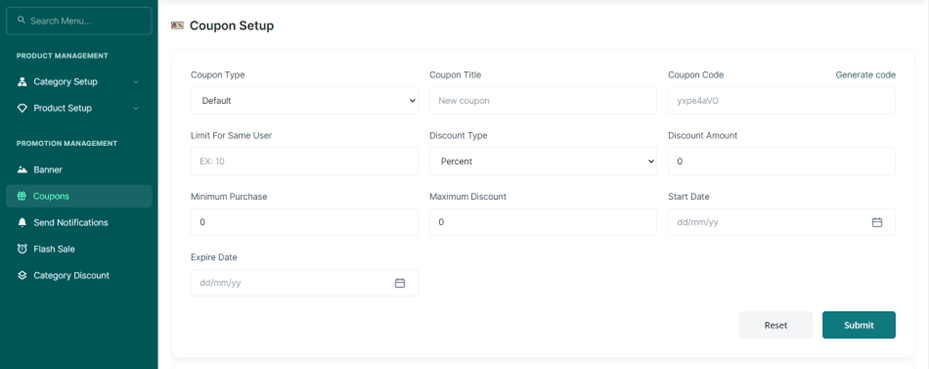
• Generate a Coupon Code using the generate code button above the Generate Code
• To limit the number of times a customer can use the coupon, Input the number in the Limit for Same User Space Bar.
• Choose if the Discount is in percentage or amount from the Discount Type.
• Input the Discount amount either as a percentage or a direct amount.
• Input the minimum number of products the customer must add to their cart to access the coupon.
• Input the Maximum Discount the customer can access through the Coupon.
• Select the Starting Date of the Coupon from the Start Date Space Bar.
• Select the Expiry Date of the Coupon from the Expiry Date Space Bar.
• Press the Submit Button.
• Or the Reset Button to Erase your Entry.